
Workflow Recorder And Callable Artifacts
Workflow recordings can become generalized, repeatable artifacts that Ambient treats like callable tools.
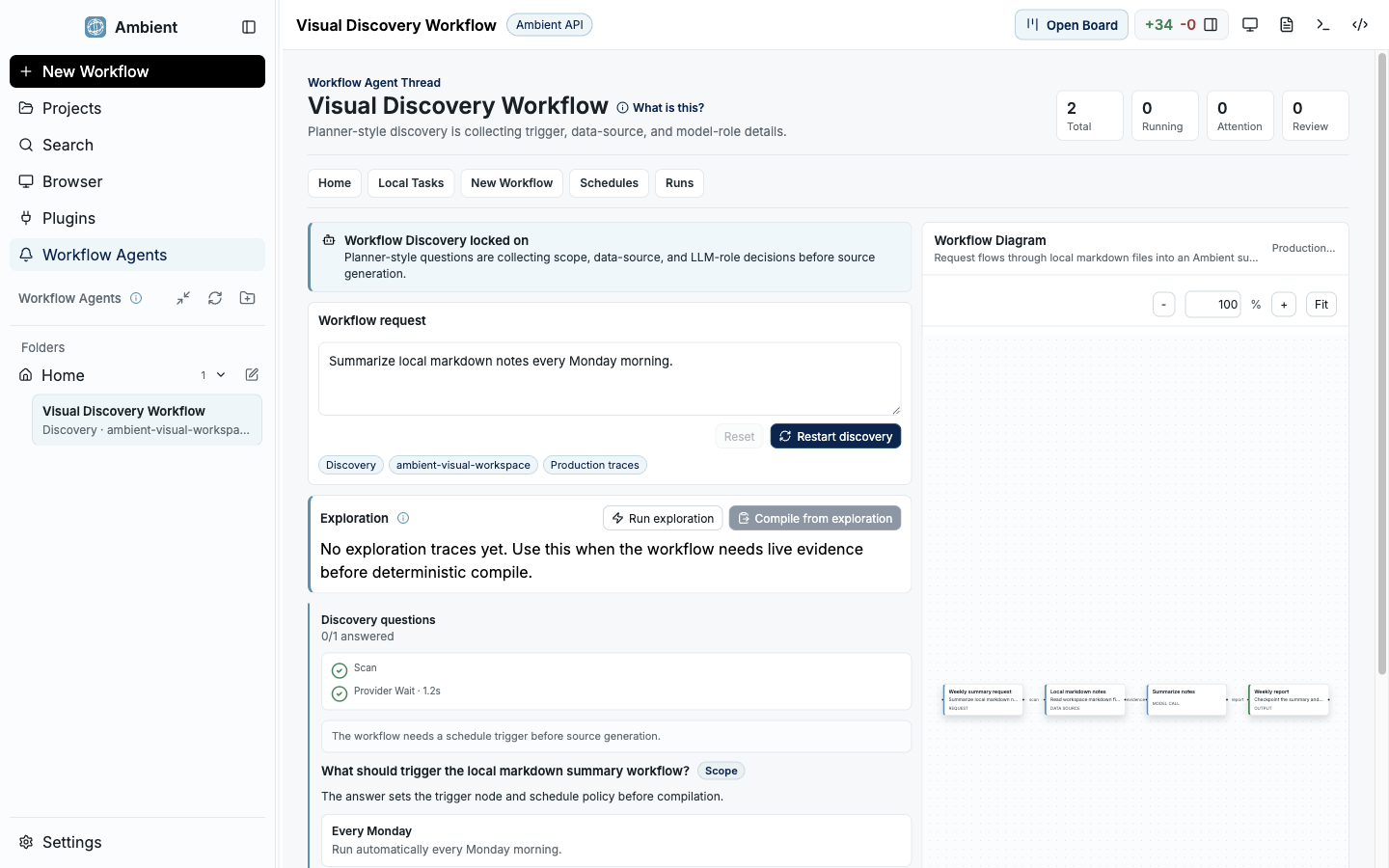
Workflow discovery
Workflow discovery turns repeated work into inspectable candidates before they become callable artifacts.
When to record a workflow
Use the Workflow Recorder when a task is likely to repeat and the successful path matters: research routines, release checks, connector setup, report generation, QA passes, or internal procedures with known review steps.
Do not record one-off work just to save a transcript. A good recording becomes a reviewed playbook with parameters, policy notes, validation expectations, and a callable shape.
Example: NYC date night research
This example teaches the full lifecycle: record a real research task, use search and scraping, ask an LLM to judge the options, rerank based on critical reviews, generalize the workflow, confirm it, then call it later as a reusable artifact.
Start a new recording
Open Workflow Recordings and click New Workflow Recording. Name it NYC date night research and review ranking. Keep the task narrow enough that a future user could rerun it with a different city, date, budget, and vibe.
Give the first task prompt
Ask: Find date night activities in New York City for this Friday. Include price, neighborhood, reservation constraints, weather sensitivity, links, and why each option could be memorable.
Let Ambient research with visible providers
Allow search and public web extraction. If Scrapling or web research is not ready, the docs should route the user back to Quickstart Core Setup rather than pretending the workflow can proceed.
Add the judging step
Ask an LLM judge to score each candidate on novelty, logistics, cost, conversation quality, weather risk, and reservation friction. Require short rationales, not just numeric scores.
Add critical-review reranking
Ask Ambient to gather review signals and rerank candidates when public reviews contradict the venue's own description. Preserve citations and explain any ranking changes.
Produce the final artifact
Request a ranked shortlist with reservation links, backup option, travel/logistics notes, and a short avoid list. This artifact becomes the output shape the workflow should preserve.
Review with Ambient
End the recording and click Review with Ambient. Ambient should summarize the successful path, identify parameters, list preconditions, flag secrets or private data, and draft the reusable workflow.
Edit and confirm the workflow
Parameterize city, date, budget, party size, neighborhood preference, vibe, mobility constraints, and review-weighting. Confirm only after validation, failure modes, and expected outputs are clear.
Call the confirmed workflow
Start a new chat and invoke the workflow with a different city or date. The docs should show the expected callable artifact card and the proof that the workflow reused the reviewed playbook.
What the user should see
Recording state
The UI should make it clear that a workflow is being recorded and that tool calls, user decisions, validation results, and output shape are being captured for review.
Permission prompts
High-impact steps such as web extraction, connector access, filesystem changes, and workflow invocation should remain approval-gated and visible.
Review draft
Review with Ambient should produce a draft playbook, not an opaque memory. Users need to edit parameters, remove sensitive data, and confirm the contract.
Callable artifact
After confirmation, the workflow should be discoverable and invokable like a reviewed tool with inputs, expected outputs, and policy notes.
Generalization rules
- Parameterize task-specific inputs instead of replaying hidden local paths, dates, locations, accounts, or personal preferences.
- Redact secrets and workspace-private data before confirmation.
- Record preconditions such as required providers, web access, account connectors, local runtimes, or model capabilities.
- Preserve expected outputs, validation commands, failure modes, retry policy, and stop conditions.
- Expose the confirmed artifact through a callable workflow registry only after review.
Workflow Recorder FAQ
How is this different from a saved prompt?
A confirmed workflow records the successful process, parameters, permissions, validation, and output contract. It is meant to be invoked as a reviewed artifact rather than copied as free-form prompt text.
Can a workflow use Scrapling or other providers?
Yes, if the provider is installed, permitted, and appropriate for the task. The workflow should record provider prerequisites and fallback expectations.
What should not be recorded?
Do not preserve raw secrets, private credentials, one-off personal data, or hidden local paths. Use Ambient-managed secret flows and parameterize sensitive inputs.