
The Open Agentic Workstation
Ambient Desktop is a local-first agentic workstation, model-orchestration engine, and miner — run capable agents on your own machine, not a quarantined VM. Curated plugins, sandboxed capabilities, and inference from a credibly neutral, zero-data-retention network.
Open source (MIT) · runs locally on macOS, Windows & Linux · ships with GLM-5.1 and Kimi K2.7 · v0.1.96
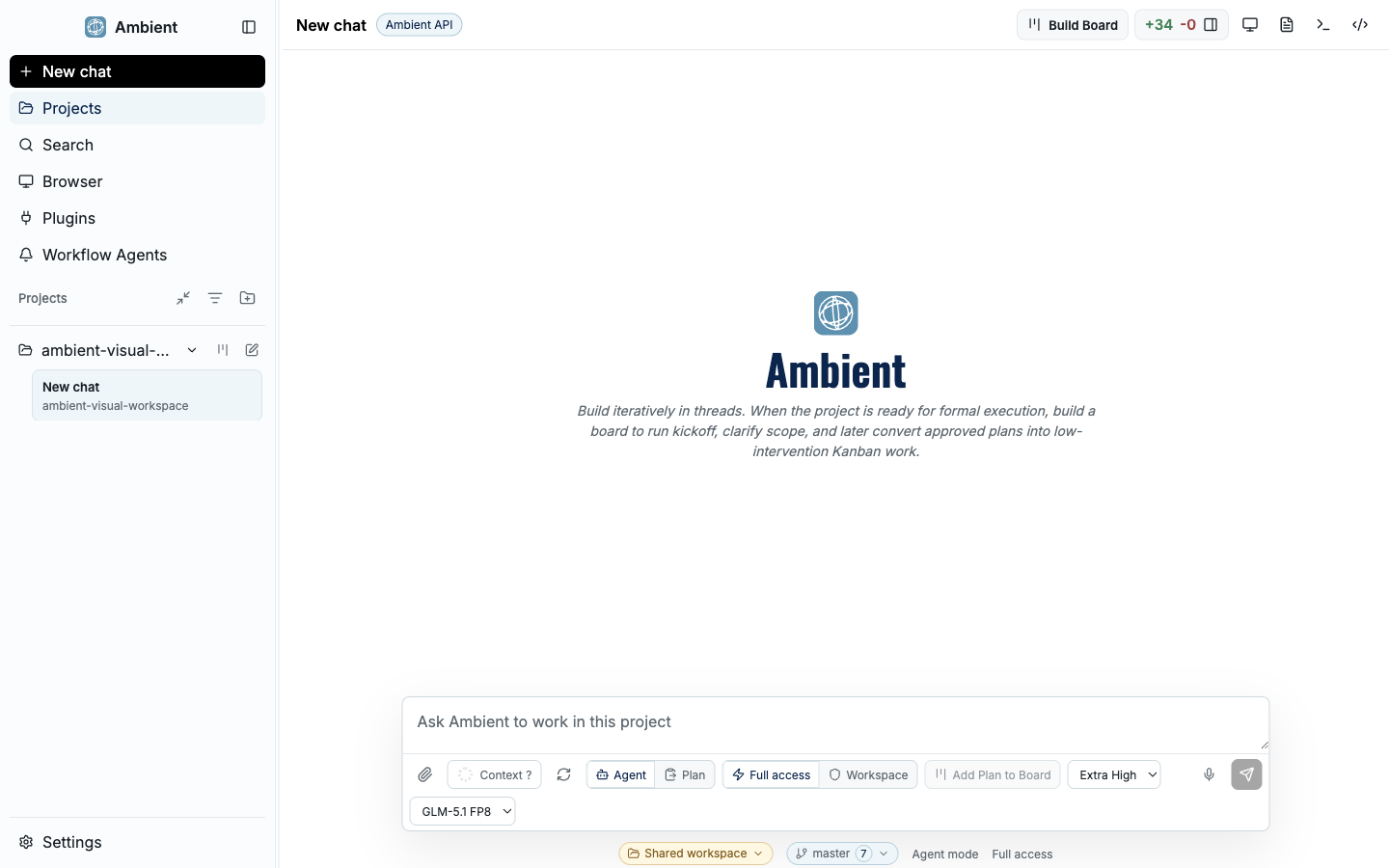
Main shell
The main Ambient Desktop shell combines chat, workspace context, navigation, and evidence panels in one local developer workstation.
A workstation, not a chat wrapper
Most agent tools hand you a chat box and a transcript. Ambient Desktop hands you a workspace. Agents operate on your real files, terminals, browsers, and source control — and every move shows up as something you can open and judge: a plan, a board card, an artifact, a screenshot, a validation command, a Git diff.
And it runs on your real machine, not a quarantined VM — because a security model that contains the risky capabilities instead of the whole agent means you do not have to choose between capable and safe. You stay the reviewer: pause, inspect the evidence behind any result, correct course, and resume without the agent losing the thread.
What makes Ambient different
These are what separate Ambient from a coding copilot or a single-prompt agent. Each one exists because long-running, autonomous work needs structure, memory, and boundaries.
Project Board
Large or ambiguous requests become a Kanban of source-backed cards with evidence, dependencies, and a review loop — not a transcript you have to scroll.
Explore the Project Board →Durable goals
Long-running goals persist their plan, evidence, and continuation state to disk, so work resumes from saved state instead of restarting from memory.
How durable goals work →Symphony orchestration
A parent session delegates scoped work to specialist children — research, implementation, review, local-model — with budgets, approvals, and an artifact-driven join.
See Symphony →Contained capabilities
Risky tools — MCP servers, scrapers, Pi packages — run behind ToolHive containers and permission policy, so the agent can work on a normal desktop without blind trust.
Read the security model →Provider routing
Search, fetch, browser, vision, local, and cloud providers are ordered by your preference and task fit, with visible fallback evidence when one is skipped.
Provider routing →Workflow Recorder
Record a successful research or ops task once, then generalize it into a parameterized, callable workflow that runs like a reviewed tool.
Record a workflow →Open and yours
MIT-licensed harness, local-first, zero-data-retention inference. The code is open, your files stay on your machine, and the API keeps nothing. Bring your own models or use the network's.
API & endpoints →Frontier models, included
Ambient ships with two strong models, both included and served from a credibly neutral, zero-data-retention network. Use either as your main agent or for sub-agents, and switch between them per chat or in Settings.
Prefer your own tooling? The same models are available through Ambient's OpenAI-compatible API — see API & Endpoints.
GLM-5.1
The default model for Ambient Desktop (GLM-5.1 FP8) — fast and capable, tuned for agentic coding and tool use.
Kimi K2.7
Kimi K2.7 Code is supported as a first-class alternative, selectable as your main model or for sub-agents.
Get started in three steps
Install the app
Download the signed build for macOS, Windows, or Linux, or build from source. First launch runs health checks for providers and runtimes.
Installation guide →Follow the Welcome Folder
A pinned first-run project walks you through the shell, Core Setup, and Plugin Setup using the real product surfaces — not a sample repo.
Open the Quickstart →Run your first task
Build a small calculator three ways — direct prompt, Planner-to-goal, and Planner-to-board — and inspect the proof behind each result.
Three task paths →Where the product is going
Coding is the first high-value application because it exercises every hard part of agentic systems. But the destination is bigger: Ambient Desktop is the local front door to a network building intelligence as a global utility — a model-orchestration engine, a blockchain client, and the miner for the upcoming open season of Testnet mining. Here are the four surfaces and the routing fabric that ties them together.
Agentic Desktop
Developer PreviewThe local-first coding and workflow surface: Project Board, durable goals, browser evidence, Git review, and artifact previews. This is what ships today.
Ambient Network Client
In DevelopmentThe first-party client for embedded key flow, balances, programs, transaction evidence, Tool Oracle, and x402 — in active development.
Ambient Mini Miner
RoadmapAn opt-in surface to host a local model, mark a machine as mineable, and earn network rewards when eligible. On the roadmap, built on today's llama.cpp runtime.
Curated Capability Storefront
RoadmapA reviewed marketplace for Ambient-compatible Web2 and Web3 capabilities: MCP servers, CLI packages, Pi tools, and workflow artifacts.
Honest about maturity
Every page carries an explicit label — Available, Developer Preview, In Development, or Roadmap — so you always know what to rely on, what to test, and where implementation is still moving. These are operational signals, not marketing tiers.
Run agents you can trust
Ready to run agents on your own machine, with inference that keeps nothing? Start with the Quickstart, or download Ambient Desktop for your platform.